
How to Create a Pull-Based Project Management System
Most teams don’t struggle because they lack effort—they struggle because they start too much work at once.
That’s exactly what a pull-based project management system fixes. Instead of pushing new tasks into the system based on deadlines, pressure, or “just in case” planning, a pull system only starts work when there’s real capacity to do it.
The result is simple (and powerful): less chaos, faster flow, and more reliable delivery.
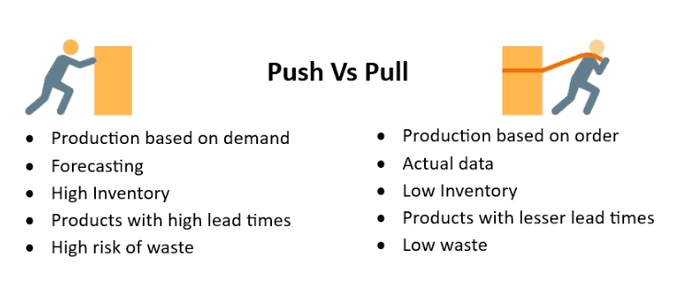
Pull vs Push: The Difference in One Sentence
Push systems start work because someone says “start.”
Pull systems start work because the next step is ready and capacity exists.
In practice, pull reduces multitasking, prevents overloaded teams, and makes “what to do next” obvious.
Why Pull Systems Work (Especially for Knowledge Work)
Pull systems are built on a few core ideas from Lean and Kanban:
- Limit work-in-progress (WIP): Start less to finish more.
- Visualize work: Make bottlenecks visible early.
- Manage flow: Improve how work moves, not just how busy people are.
- Create clear policies: Define how work enters and progresses.
When you design your system around flow, your team stops “feeling busy” and starts actually delivering.
Step-by-Step: How to Create a Pull-Based System
Step 1: Visualize Your Current Workflow
Start by mapping the real steps your work goes through. For many teams, this looks like:
- Intake / Requests
- Ready
- In Progress
- Review / QA
- Done
Keep it simple at first. Your goal is visibility, not perfection.
Step 2: Create a Clear “Intake” (So Work Doesn’t Ambush the Team)
A pull system fails if requests bypass the system. Build a single place where all work requests land:
- a dedicated “Intake” column
- a request form that creates a card
- a weekly intake review meeting
This prevents random interruptions and makes priorities explicit.
Step 3: Define What “Ready” Means
Pull requires clarity. Your team should not pull work that’s vague or missing key details.
Create a lightweight Definition of Ready checklist, such as:
- clear goal / expected outcome
- owner assigned
- constraints and dependencies known
- acceptance criteria defined
If an item isn’t ready, it stays in intake until it is.
Step 4: Set WIP Limits (This Is the Engine of Pull)
WIP limits are what turn a board into a pull system.
Example:
- In Progress: max 3 items
- Review: max 2 items
When the WIP limit is full, the team can’t pull new work. Instead, they focus on finishing, removing blockers, or helping review.
Step 5: Establish Pull Policies (Simple Rules Everyone Follows)
Write short policies directly next to the workflow, like:
- “Only pull from Ready when WIP allows.”
- “If Review is full, stop starting and swarm review.”
- “Blocked items must be tagged and reviewed daily.”
Policies reduce confusion and help the system run without constant negotiation.
Step 6: Add a Portfolio Layer (If You Manage Multiple Projects)
If you’re managing many projects, pull needs to work at the portfolio level too—otherwise you’ll still overload teams with “priority #1” work from everywhere.
To do this, create a simple portfolio view:
- Portfolio Backlog (candidate projects)
- Selected / Ready (approved, defined, resourced)
- In Progress (limit how many projects can run)
- Completed
Then apply the same principle: limit portfolio WIP. If you can only run 3 projects at a time, the 4th must wait until capacity opens.
Step 7: Inspect and Improve Weekly
Pull systems improve when you review flow regularly. Once a week, ask:
- Where is work getting stuck?
- Which step is overloaded?
- Are WIP limits too high (or too low)?
- What policies need clarification?
Small tweaks compound into major performance gains over time.
What to Measure in a Pull System
You don’t need dozens of metrics. Start with the basics:
- Lead time: how long work takes from request to done
- Throughput: how many items finish per week
- WIP: how much work is active right now
If lead time drops while throughput stays steady (or increases), your pull system is working.
Common Mistakes (And How to Avoid Them)
- Starting without WIP limits: you’ll visualize chaos instead of fixing it.
- Pulling “not ready” work: unclear tasks create rework and delays.
- Ignoring blocked work: blocked cards must be visible and reviewed frequently.
- Too many workflow steps: keep stages meaningful and easy to manage.
- No portfolio limits: too many projects will overload every team.
Final Thoughts
A pull-based project management system is one of the simplest ways to get faster delivery without pushing people harder.
When you limit WIP, make work visible, and pull only when capacity exists, you create a calmer, more predictable system—one where teams can focus, finish, and continuously improve.
Related reading:
