
How to Build a Portfolio Kanban System
Running multiple projects at the same time is where most organizations quietly lose speed, focus, and trust.
People get pulled in five directions, priorities change mid-week, and “urgent” work crowds out important work. The result is predictable: too much Work-in-Progress, long lead times, and constant context switching.
A Portfolio Kanban system fixes that by giving leaders and teams one clear visual: what we’re working on, what’s blocked, what’s next, and what we’re not starting yet.
This guide shows you exactly how to build a Portfolio Kanban system step-by-step, including a practical board layout, WIP limits, prioritization rules, and operating routines that keep it running.
What Is Portfolio Kanban?
Portfolio Kanban is a visual system for managing initiatives across multiple projects, teams, or value streams. Unlike a team Kanban board (which focuses on tasks), portfolio Kanban focuses on:
- initiatives, epics, programs, or “big bets”
- capacity across teams
- priority and sequencing
- risk, dependencies, and decision points
Think of it as a “control tower” that keeps the organization aligned on what matters most.
Why Portfolio Kanban Works (When Portfolios Usually Fail)
Most multi-project environments fail for the same reasons:
- Too many initiatives started (and too few finished)
- Unclear priorities (everything is “top priority”)
- Hidden constraints (key people are overloaded)
- Dependencies explode (teams block each other constantly)
Portfolio Kanban makes these problems visible — then forces better decisions through WIP limits, explicit policies, and a simple cadence.
Step 1: Define What a “Portfolio Item” Is
Before you build the board, define what flows through it. Common portfolio items include:
- Strategic initiatives
- Product epics
- Major improvements (Kaizen-level)
- Compliance or regulatory work
- Key customer commitments
Rule: one card = one meaningful outcome. If the item can’t be explained clearly, it’s not ready for the portfolio.
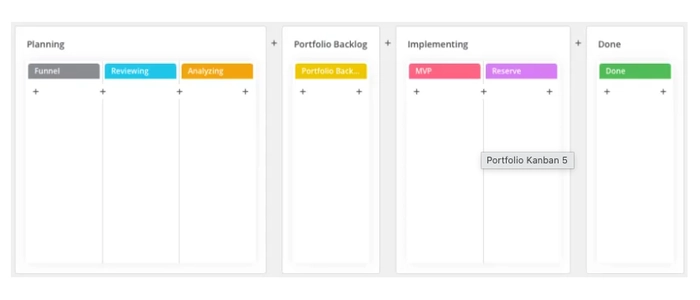
Step 2: Build a Simple Portfolio Kanban Board (Copy This Layout)
Start simple. You can always evolve later. A strong starter board looks like this:
- Funnel (ideas, requests, opportunities)
- Review (triage + clarify)
- Ready (prioritized and approved to start)
- In Progress (actively being executed)
- Blocked (stuck due to dependency/decision)
- Done (delivered outcomes)
Pro tip: If you manage multiple work types, add swimlanes (e.g., “Strategic,” “Customer,” “Compliance,” “Improvement”). Keep it readable at a glance.
Step 3: Set Portfolio WIP Limits (This Is the Whole Game)
Portfolio Kanban works because it limits how many initiatives the organization can actively execute at once.
Start with conservative limits like:
- Review: 5–10 items (so decisions happen)
- Ready: 3–7 items (your “queue” is not a parking lot)
- In Progress: 3–5 items total (yes, total)
- Blocked: no limit — but treat it as a fire alarm
If you can’t accept small WIP limits, you’re not doing portfolio management — you’re doing portfolio wishful thinking.
Step 4: Create “Definition of Ready” and “Definition of Done”
Most portfolio chaos comes from starting work too early. Fix it with explicit rules.
Definition of Ready (DoR)
- Clear problem statement and desired outcome
- Named owner and stakeholders
- Basic estimate of effort / complexity
- Known major dependencies
- Reason for priority (why now)
Definition of Done (DoD)
- Outcome delivered (not just “built”)
- Adoption/rollout completed (as applicable)
- Success criteria measured or verified
- Documentation/standardization updated
Step 5: Add a Simple Prioritization Method (Don’t Overcomplicate)
Choose one prioritization method and stick with it. Practical options:
- Cost of Delay: what does waiting cost us?
- Risk First: prioritize items that reduce major risk early
- Capacity Fit: prioritize what matches current constraints
- OKR Alignment: prioritize what moves your top objectives
If OKRs are part of your operating model, see: Agile OKRs: How to Align Goals with Daily Execution.
Step 6: Make Ownership Visible (Portfolio Work Must Have a Single “Driver”)
Every portfolio card should show:
- Owner/Driver (one person accountable)
- Team(s) involved
- Target date window (not a fantasy date)
- Top dependency (if any)
This prevents “everyone owns it” (which means nobody owns it).
Step 7: Install Lightweight Operating Routines
A Portfolio Kanban board without routines becomes wall decoration. Keep it alive with three cadences:
Weekly Portfolio Review (30–60 minutes)
- Re-prioritize Ready
- Confirm WIP limits and capacity
- Escalate blockers (decide owners + next actions)
Daily or Twice-Weekly Execution Sync (10–15 minutes)
- Focus only on In Progress and Blocked
- Ask: “What will move cards to Done this week?”
If you lead using visual management, this connects well with: Daily Management Boards: How Leaders Stay Aligned.
Monthly Strategy Check (60 minutes)
- Remove stale initiatives
- Confirm alignment to goals
- Make “stop starting” decisions
Step 8: Track the Right Portfolio Metrics (Simple + Useful)
Don’t overload the board with analytics. Track what drives better decisions:
- WIP: how many initiatives are active right now?
- Throughput: how many initiatives finish per month?
- Lead time: how long from “Ready” to “Done”?
- Blocker age: how long items sit blocked
If you want to visually manage performance, see: KPI Boards: How to Track What Actually Matters.
Common Mistakes to Avoid
- Turning “Ready” into a parking lot (too many approved items)
- No WIP limits (portfolio becomes a list, not a system)
- Starting work without clarity (weak Definition of Ready)
- Not resolving blockers (blocked column grows quietly)
- Too many priorities (leaders won’t say “no”)
Final Thoughts
If you manage multiple projects, the biggest lever you have is not better meetings — it’s better flow.
A Portfolio Kanban system creates that flow by making priorities explicit, limiting WIP, and forcing the organization to finish what it starts.
For more portfolio-level clarity, you may also like:
