
What Is a Project Portfolio Board? (Beginner Guide)
When you’re managing multiple projects at once, the hardest part usually isn’t “doing the work.” It’s deciding what to do next, what to pause, and how to keep priorities visible across teams.
That’s exactly what a project portfolio board is for: a visual system that helps you manage many projects as one portfolio — not as disconnected to-do lists.
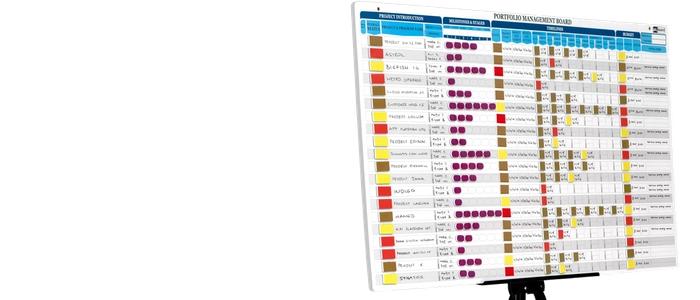
What Is a Project Portfolio Board?
A project portfolio board is a high-level visual board used to track, prioritize, and coordinate multiple projects in one place. Instead of focusing on task-level execution, it focuses on:
- which projects are active (and which are paused)
- what’s blocked and why
- where capacity is going
- what should start next
Think of it as your “executive dashboard,” but one that teams can actually use day-to-day — because it’s visual, simple, and constantly visible.
Project Board vs Portfolio Board
These are often confused, but they serve different levels of management:
- Project board: task flow inside one project (To Do → Doing → Done)
- Portfolio board: project flow across many projects (Idea → Ready → Active → Done)
If a project board helps a team execute, a portfolio board helps leaders and teams choose wisely and avoid overload.
Why Portfolio Boards Work
1) They Make Priorities Impossible to Ignore
Most portfolio “priorities” live inside documents, slides, or software dashboards that nobody checks daily. A portfolio board makes priorities visible in one shared place, so decisions stay aligned.
2) They Prevent Too Many Projects From Running at Once
Many organizations don’t have a “project problem.” They have a too-many-projects problem. A portfolio board is designed to support WIP limits at the project level — meaning you intentionally run fewer projects at a time so more projects actually finish.
3) They Improve Coordination Across Teams
Dependencies are easier to manage when everything is visible. If Project A is blocked by Project B’s completion, you can see it immediately — and take action.
4) They Make Progress (and Stagnation) Obvious
When a project card sits in “Blocked” for two weeks, it becomes a visible signal, not an invisible status note. That visibility changes behavior.
What a Portfolio Board Typically Includes
A portfolio board doesn’t need to be complicated. A simple and effective structure includes:
- Backlog / Ideas (potential projects)
- Ready (approved and ready to start)
- Active (work in progress)
- Blocked (needs attention)
- Done (completed outcomes)
You can also add swimlanes for:
- department (Engineering, Ops, Marketing)
- strategic theme (Growth, Cost, Quality)
- priority class (Must-do, Should-do, Could-do)
How to Set Up a Project Portfolio Board
Step 1: Define What Counts as a “Project”
To keep the board clean, define a project as something that:
- takes multiple weeks (or multiple people)
- delivers a measurable outcome
- has a clear “done” definition
Step 2: Create One Card Per Project
Each project card should include:
- project name
- owner
- expected outcome
- due date (optional)
- key dependency (optional)
Step 3: Set a Project-Level WIP Limit
This is the most powerful rule on the board. For example:
- Max 3 active projects per team, or
- Max 8 active projects total across the department
When your WIP limit is full, you don’t start new projects. You finish or unblock what’s already started.
Step 4: Review It on a Cadence
A portfolio board is most effective when it’s reviewed regularly — weekly is common. Keep the meeting short and structured:
- What moved to Done?
- What’s blocked and what decision is needed?
- What’s the next project to pull from Ready?
Step 5: Make It a Living System
The board should reflect reality, not an ideal plan. If a project is paused, show it. If priorities change, update them. A portfolio board creates alignment because it stays current.
Common Mistakes to Avoid
- Too many columns: keep it readable at a glance.
- No WIP limit: without limits, it becomes a “pretty list” instead of a control system.
- Mixing tasks and projects: portfolio boards track projects; project boards track tasks.
- No decision-making cadence: the board must drive choices, not just reporting.
Related Reading
- Kanban Flow vs Batch Processing: What’s Faster?
- What Is Continuous Flow? (And How to Achieve It)
- Flow Efficiency Formula (Explained So Anyone Can Use It)
Final Thoughts
A project portfolio board is one of the simplest ways to improve execution across multiple projects — because it forces clarity, makes priorities visible, and prevents overload.
When you can see your portfolio, you can manage your portfolio. And when you manage the portfolio well, teams finish more work — with less chaos.
