
Kanban Flow vs Batch Processing: What’s Faster?
If you’ve ever wondered why work feels “busy” but results still arrive slowly, the answer is often hiding in plain sight: batch processing.
Most teams don’t intentionally choose batching — it just happens. You start a lot of work, group it into piles, and push it forward when you have time. The problem is that batching creates hidden waiting time, queues, rework, and long feedback loops.
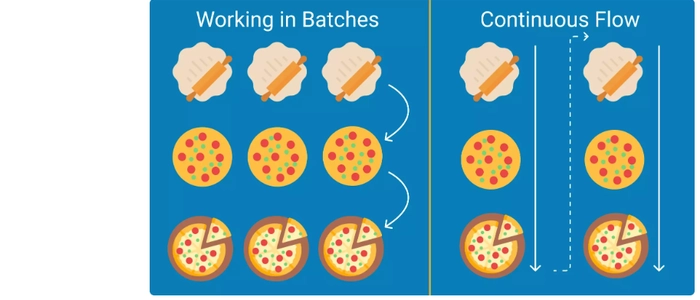
In contrast, Kanban flow is built around finishing work in small pieces, continuously, with limited work-in-progress (WIP). So which is faster?
In most knowledge-work environments, flow is faster than batching because it reduces waiting time and accelerates feedback. Let’s break it down with simple examples and practical steps you can use immediately.
Quick Definitions
What is Kanban flow?
Kanban flow means work moves continuously from “start” to “done” in small pieces. The system is optimized to keep work moving smoothly through the workflow with minimal waiting, minimal multitasking, and fast completion.
What is batch processing?
Batch processing means work moves in groups (batches). For example: writing 10 tasks before starting any of them, testing a week’s worth of changes all at once, or completing an entire phase for many items before passing them forward.
Why Kanban Flow Is Usually Faster
1) Flow reduces waiting (queues)
Batching creates queues: work sits idle waiting for the next step. Even if each step is “efficient,” the total time from start to finish grows because items spend most of their life waiting.
Flow limits how much work is active at once, which reduces queue length and speeds up completion.
2) Flow shortens feedback loops
With batching, feedback arrives late (often after a lot of work is already done). That increases rework and delays.
With flow, you deliver smaller pieces sooner, get feedback sooner, and adjust sooner — which reduces waste and accelerates learning.
3) Flow exposes bottlenecks quickly
In a flow system, when work stops moving, the bottleneck becomes obvious. In a batching system, bottlenecks hide inside piles of partially completed work.
4) Flow reduces context switching
Batching encourages starting many things (because “we’ll finish later”). That increases multitasking. Flow encourages finishing before starting, which improves focus and speed.
When Batch Processing Can Be Faster
Batching isn’t always wrong. It can be useful when:
- Setup costs are high (e.g., switching a machine or environment is expensive)
- Work is highly repetitive and standardized
- Compliance requires grouped handoffs (rare, but it happens)
Even then, the best approach is usually smaller batches — not “one giant batch.”
A Simple Example: Why Flow Wins
Imagine 10 tasks that each take 1 day of effort.
- Batch approach: you start all 10, move them through phases in chunks, and the last task finishes very late.
- Flow approach: you limit WIP (say 2–3 tasks at a time) and finish tasks continuously. You still do the same total effort, but tasks complete sooner and more regularly.
The key difference: flow reduces the time work spends waiting, which is usually the biggest part of total lead time.
How to Shift from Batch Processing to Kanban Flow
Step 1: Visualize the workflow
Map your real stages (not your “ideal” ones). Common stages include:
- Ready
- In Progress
- Review
- Test / Validate
- Done
If your board doesn’t reflect reality, it can’t create flow.
Step 2: Limit WIP (this is the engine of flow)
Pick a small WIP limit per stage (start with 2–4). When the limit is reached:
- Stop starting new work
- Swarm to finish and unblock what’s already started
This is how flow replaces “busy” with “finished.”
Step 3: Define clear “done” policies per column
Flow breaks down when work moves forward while still incomplete. Add simple policies like:
- “Review” means the work is complete and ready for review (not half-done)
- “Done” means shipped / delivered / accepted (not “almost done”)
Step 4: Reduce batch sizes intentionally
If batching happens at handoffs (like testing or review), reduce it on purpose:
- review 1–2 items daily instead of 10 items weekly
- test continuously instead of at the end
- release in smaller increments
Step 5: Measure what matters
To prove flow is faster, track simple flow metrics:
- Lead time (start → finish)
- Throughput (how many items finished per week)
- WIP (how much is active right now)
You’ll typically see lead time drop when WIP is limited and batch sizes shrink.
Signs You’re Still Stuck in Batch Mode
- Lots of work “in progress,” but little work finishes
- Big piles in Review/Test
- Long delays between “started” and “done”
- Frequent multitasking and priority switching
If that sounds familiar, you don’t need more speed — you need more flow.
Related Reading
- What Makes a Good Kanban Board? (Real Examples)
- Kanban Board Examples from Real Teams
- Kanban Cards: How to Use Them the Right Way
- Kanban Maturity Levels: Where Is Your Team?
- How to Build a Kanban Board (Step-by-Step)
- How to Choose Between Scrum and Kanban (Real Examples)
- Agile vs Waterfall: Which Method Is Right for Your Project?
- Kanban vs Scrum: Which One Should Your Team Use?
Final Thoughts
If your goal is speed, predictability, and faster delivery, Kanban flow usually beats batch processing — not because people work harder, but because the system creates less waiting, less rework, and less context switching.
Start small: visualize the workflow, set WIP limits, shrink batch sizes, and let the board teach you where flow gets stuck. That’s where the real gains are.
