
What Makes a Good Kanban Board? (Real Examples)
A Kanban board is simple to create — but surprisingly easy to get wrong.
Some boards look great yet don’t improve delivery. Others feel “messy” but drive smooth flow, better focus, and faster outcomes.
So what separates a good Kanban board from a board that’s just wall decoration?
What “Good” Means for a Kanban Board
A good Kanban board does three things consistently:
- Makes work visible (what’s happening right now)
- Improves flow (reduces delays and bottlenecks)
- Supports better decisions (priorities, tradeoffs, capacity)
If your board doesn’t change behavior, it’s not doing its job.
7 Traits of a Good Kanban Board
1) Clear workflow stages (not vague columns)
“To Do / Doing / Done” is a start — but most real workflows need more clarity.
Good boards use stages that reflect how work truly moves, for example:
- Intake
- Ready
- In Progress
- Review
- Test / Validate
- Done
Tip: If team members often ask “Where does this go?” your columns are too ambiguous.
2) A visible “Ready” step
One of the most underrated improvements: add a Ready column before “In Progress.”
This prevents people from pulling half-baked tasks and creates a clean “pull” boundary: work should be ready before anyone starts.
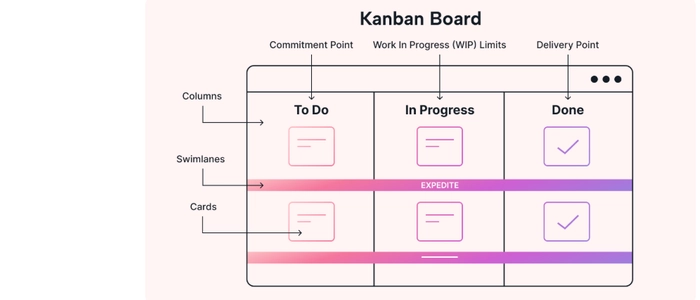
3) WIP limits that actually matter
Most teams ignore WIP limits because they treat them as optional.
A good Kanban board makes WIP limits visible and usable, like “In Progress: 3” and “Review: 2.”
When WIP is full, the rule is simple: stop starting, start finishing.
4) Clear policies (so the board isn’t open to interpretation)
Policies are short rules that answer questions like:
- What does “Ready” mean?
- When is something allowed into “In Progress”?
- What qualifies as “Done”?
- How do we handle blockers?
Without policies, a board becomes a debate. With policies, it becomes a system.
5) Fast identification of blockers
Every good board has a simple, consistent way to flag stuck work.
Examples:
- A blocker tag or magnet attached to the card
- A dedicated “Blocked” marker area
- A red indicator that’s impossible to ignore
The goal isn’t to “look busy.” The goal is to surface issues early so they get resolved faster.
6) Classes of service (optional, but powerful)
Not all work is equal. A good board can show different priority types without chaos, such as:
- Expedite (rare emergency work)
- Standard (normal flow)
- Fixed date (deadline-driven)
- Intangible (improvement work that prevents future pain)
This prevents “everything is urgent” thinking and makes tradeoffs explicit.
7) The board is used daily (not updated weekly)
A board only works if it’s the truth.
If updates happen days later, the board becomes historical — not operational. Good boards are updated in the moment, during standups, or immediately after changes.
Real Kanban Board Examples You Can Copy
Example 1: Simple team workflow (best for beginners)
- Backlog
- Ready
- In Progress (WIP 3)
- Review (WIP 2)
- Done
Why it works: Minimal, but adds pull and reduces “start too much” behavior.
Example 2: Knowledge work with approvals
- Intake
- Analysis (WIP 2)
- Build (WIP 3)
- Approval (WIP 2)
- Release
- Done
Why it works: Separates “thinking” work from “execution” work and makes approval delays visible.
Example 3: Service team (support / operations)
- New Tickets
- Triage (WIP 2)
- Working (WIP 4)
- Waiting on Customer
- Resolved
Why it works: Makes waiting explicit so “idle time” doesn’t get hidden inside “In Progress.”
Example 4: Multi-lane board for multiple work streams
Add swimlanes such as:
- Top lane: Urgent (expedite)
- Middle lane: Standard work
- Bottom lane: Improvement work
Why it works: You see priority and purpose without mixing everything together.
Common Mistakes That Make Boards “Look Good” but Perform Badly
- Too many columns that don’t match reality
- No WIP limits (or limits nobody follows)
- Everything stays “In Progress” with no blocker signal
- Board is updated late, so decisions are made elsewhere
- No policies, so the board becomes subjective
How to Improve Your Kanban Board Quickly
If you want the fastest upgrades with the biggest impact, do this in order:
- Add a Ready column.
- Add WIP limits to your 1–2 biggest bottleneck columns.
- Add a visible way to mark blocked work.
- Write short policies for “Ready” and “Done.”
- Use the board daily.
Related Reading
- What Is Lead Time vs Lag Time? (Easy Explanation)
- Lead Time vs Throughput: Which Metric Should You Track?
- How to Reduce Lead Time in Knowledge Work
- What Is Cycle Time? (Beginner Lean Guide)
- Little’s Law Explained: Why Flow Is Predictable
- Why Visual Management Outperforms Digital Tools
- Work Visualization: Why Seeing Work Improves Results
- Visual Management Boards: Examples & Templates
Final Thoughts
A good Kanban board isn’t defined by how clean it looks — it’s defined by what it changes.
When your board reflects real workflow stages, limits WIP, highlights blockers, and guides daily decisions, it becomes a true performance tool — not just a tracking surface.
Start simple, improve one step at a time, and let the board teach you where the system needs attention.
