
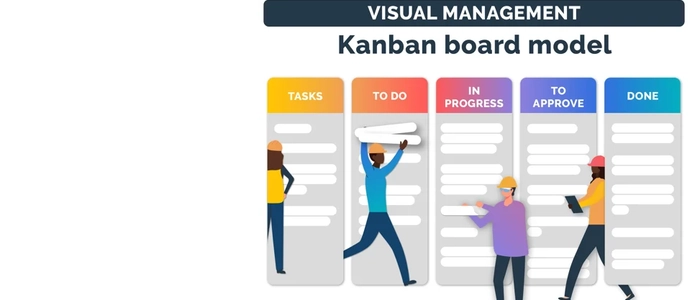
Why Visual Management Outperforms Digital Tools
Digital tools are everywhere — Jira, Trello, Asana, Monday, spreadsheets, dashboards, and endless notifications.
But here’s the uncomfortable truth many teams discover the hard way:
Seeing work in the real world often creates better performance than tracking work in software.
This is why visual management — a core Lean practice — continues to outperform digital-only project systems in many real environments.
What Is Visual Management?
Visual management means making the status of work obvious at a glance — without digging through tools, reports, or meetings.
When visual management is working, you can walk into a workspace and instantly answer:
- What are we working on?
- What’s blocked?
- What’s most important right now?
- Are we ahead, behind, or on track?
Why Visual Management Often Beats Digital Tools
1) It’s always visible — not hidden behind logins, tabs, and filters
Digital tools are powerful, but they’re also easy to ignore. A board inside a browser competes with everything else on your screen.
A physical visual system is different: it becomes part of the environment — a constant reminder of priorities, flow, and problems.
Visibility creates alignment without extra effort.
2) It reduces “status chasing” and increases real conversations
Digital systems often lead to:
- “Can you update your ticket?”
- “Where is this at?”
- “Did anyone see my comment?”
Visual management reduces the need to chase updates because the truth is visible.
Teams can spend less time reporting and more time solving.
3) It improves focus by reducing tool-switching and distraction
Digital work can be nonstop context switching — messages, notifications, dashboards, and tabs.
A visual board creates a simpler decision space: what’s in progress, what’s blocked, what’s next.
Less noise → clearer decisions → better flow.
4) It strengthens accountability naturally
When work is visible to everyone, ownership becomes clearer.
Not in a toxic “surveillance” way — but in a healthy, team-based way where commitments are transparent and support becomes easier.
5) It makes problems impossible to hide
Digital tools can unintentionally hide issues:
- Work sits “In Progress” for weeks
- Blockers get buried in comments
- Bottlenecks are visible only in reports no one checks
Visual management exposes reality fast. If something is stuck, you see it.
And what you can see, you can fix.
6) It supports faster learning and continuous improvement
Lean improvement works best when teams can observe the system.
A visual board helps teams notice patterns quickly:
- Where work piles up
- Which steps cause delays
- What keeps getting blocked
- How often priorities change
This makes retrospectives more grounded, because the workflow is literally visible.
When Digital Tools Still Win
Digital tools are extremely useful — especially when you need:
- Remote access across multiple locations
- Searchable history and documentation
- Automated reporting and data extraction
- Large-scale dependency tracking
The real goal isn’t “physical vs digital.”
The goal is clarity. Many teams get the best results when visual management is the operational center, while digital tools support recordkeeping and async collaboration.
The Best Approach: Visual-First + Digital Support
If you want the strongest setup, try this model:
- Physical board = daily execution, standups, priorities, blockers, flow
- Digital tool = documentation, long-term planning, reporting, remote visibility
This gives you the human benefits of visibility and collaboration while still keeping the advantages of data and access.
Simple Ways to Start Visual Management
You don’t need a huge transformation. Start small:
- Create a basic workflow board: Ready → In Progress → Review → Done
- Add a visible blocker signal (e.g., a red marker or magnet)
- Add one metric display (e.g., tasks completed this week)
- Review it daily for 5–10 minutes
Once the habit exists, you can expand into KPIs, swimlanes, WIP limits, and improvement tracking.
Related Reading
- Visual Project Management: Why Seeing Work Beats Tracking Work
- Visual Workflows: How Seeing Work Improves Decision Making
- Visual Management Boards: Examples & Templates
- Work Visualization: Why Seeing Work Improves Results
- Visual Management Boards: Examples & Templates
Final Thoughts
Digital tools can organize information — but visual management changes behavior.
When teams can see work, they collaborate more naturally, spot problems faster, and make better decisions with less effort.
If you want better flow, stronger accountability, and fewer surprises, don’t just track work — make it visible.
