
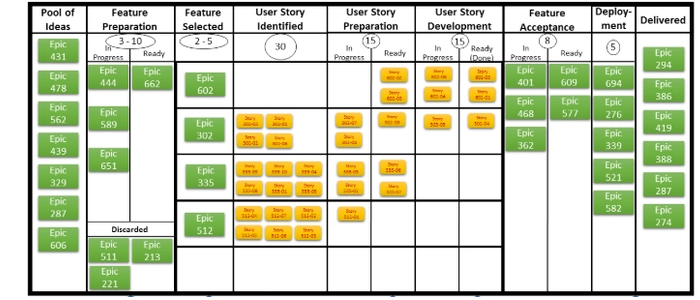
Kanban Board Examples from Real Teams
Kanban boards are simple on the surface: visualize work, limit work-in-progress, and improve flow.
But once you start building your own board, the big question becomes:
What should a “good” Kanban board actually look like?
In this guide, you’ll see practical Kanban board examples inspired by real team needs—software, marketing, operations, and service work—plus the logic behind each layout so you can adapt it to your workflow.
Before the examples: the 3 rules that make any Kanban board work
- Make work visible: if it’s not on the board, it’s not real.
- Use clear policies: define what “ready” and “done” mean in each column.
- Control WIP: too many “in progress” items creates delays and context switching.
Now let’s look at board designs teams actually use—and why they work.
Example 1: The Classic 3-Column Board (Best for beginners)
Columns: To Do → In Progress → Done
This is the simplest Kanban board and the easiest to adopt. It’s perfect when you’re starting out or when the workflow is fairly straightforward.
When it works best:
- Small teams or solo workflows
- Work that doesn’t require many handoffs
- Teams that want clarity fast, without over-designing the system
Upgrade tip: Add a small “Blocked” marker or magnet so the team can see what is stuck instantly.
Example 2: Backlog + Delivery Flow (Best for product teams)
Columns: Backlog → Ready → In Progress → Review/QA → Done
This is a common evolution of the classic board. It separates “not ready” work from “ready-to-start” work, so the team doesn’t waste time pulling unclear tasks.
When it works best:
- Product development and software teams
- Work with a review/testing step
- Teams that want fewer rework loops
WIP idea: Put a WIP limit on “In Progress” and “Review/QA” to prevent bottlenecks from growing silently.
Example 3: Swimlane Board by Work Type (Best for mixed workloads)
Swimlanes: Customer Requests / Improvements / Bugs / Internal Work
Columns: Ready → Doing → Done (applies across lanes)
When teams handle multiple kinds of work at once, tasks compete for attention. Swimlanes help you see whether one work type is starving the others.
When it works best:
- Support + product teams
- Operations teams handling both urgent and planned work
- Any team that says, “We do everything”
Policy tip: Reserve a small WIP capacity for urgent lane items so emergencies don’t hijack the entire board.
Example 4: Marketing Content Pipeline (Best for campaigns and content)
Columns: Ideas → Drafting → Editing → Design → Scheduled → Published
Marketing work usually has many handoffs and dependencies. A pipeline board shows where content is getting stuck (editing, design, approvals, etc.).
When it works best:
- Content marketing teams
- Creative teams with review cycles
- Campaign-based workflows
Extra clarity: Use a “Needs Approval” tag so approvals don’t hide inside “Editing.”
Example 5: Service / IT Ticket Flow (Best for request-driven teams)
Columns: Intake → Triage → Doing → Waiting on Customer → Done
Service work is full of waiting—on info, access, customer replies, or vendor actions. This board makes waiting visible so the team stops blaming itself for delays it can’t control.
When it works best:
- IT, internal service teams, customer support
- Any team managing “tickets” or requests
- Work that frequently pauses for external input
Metric tip: Track how long items sit in “Waiting on Customer.” It’s often the real driver of lead time.
Example 6: “Expedite” + Standard Work (Best for predictable delivery)
Swimlanes: Expedite / Standard
Columns: Ready → Doing → Done
Many teams struggle because everything becomes “urgent.” This board forces the team to decide what truly deserves expedite treatment—while protecting capacity for normal work.
When it works best:
- Teams overloaded with last-minute requests
- Operations, manufacturing support, engineering enablement
- Any team trying to reduce firefighting
Policy tip: Limit Expedite lane to 1 item at a time. If everything is urgent, nothing is.
How to choose the right Kanban board layout
Use these quick questions to select the best structure:
- Do you need a “Ready” step? Add it if tasks often start without enough info.
- Do you have frequent waiting? Create an explicit waiting column so delays are visible.
- Do you run different work types? Use swimlanes to prevent hidden imbalance.
- Do reviews slow you down? Add a Review column and set a WIP limit there.
Final Thoughts
The best Kanban board is the one that reflects your real workflow—not an “ideal” workflow.
Start simple, make the work visible, and improve the board as you learn. When the team can see work clearly, it becomes much easier to manage priorities, reduce bottlenecks, and deliver consistently.
Keep reading:
