
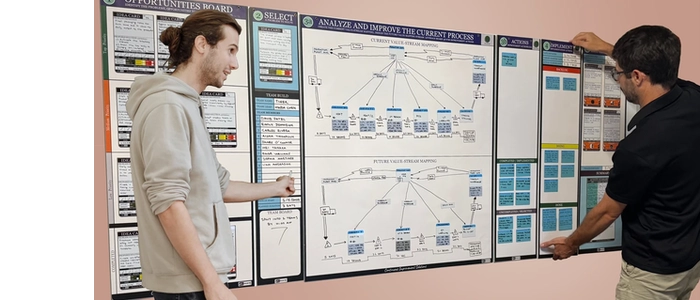
Visual Management Boards: Examples & Templates
A visual management board turns “what’s happening?” into something your team can answer in seconds—without hunting through emails, spreadsheets, or dashboards.
When designed well, it becomes the heartbeat of daily execution: priorities stay visible, problems surface early, and improvement becomes routine.
In this guide, you’ll see practical visual management board examples and simple templates you can copy—whether you’re leading a production team, managing projects, or running daily operations.
What Is a Visual Management Board?
A visual management board is a shared, visible workspace that communicates the current reality of work—status, priorities, performance, and problems—at a glance.
It typically includes:
- What matters today: priorities and key commitments
- How we’re performing: a small set of KPIs
- What’s stuck: blockers, issues, risks, or defects
- What we’re improving: actions, experiments, and follow-ups
Why Visual Boards Work
- Clarity: the team shares one source of truth
- Faster decisions: problems become obvious sooner
- Accountability: owners and due dates are visible
- Consistency: daily routines stick when the board is always there
- Continuous improvement: issues don’t disappear—they get tracked
Quick Design Rules for Any Visual Management Board
Before the templates, a few rules that prevent boards from becoming wall art:
- Keep it small: only what the team reviews regularly
- Make ownership explicit: every open item has one owner
- Use signals: red/green, blocker flags, aging markers
- Review on a cadence: daily/weekly reviews are the “engine”
- Prefer physical visibility: if it’s not seen, it won’t be used
Example 1: Daily Team Huddle Board Template
Best for: operations teams, support teams, project teams, supervisors
Template Layout
- Today’s Priorities (Top 3)
- Plan vs Actual (lightweight check)
- Blockers / Escalations (with owner + next step)
- Actions / Follow-ups (with due date)
How to Use It
- Start each huddle by confirming the Top 3 priorities.
- Review blockers next (not last) to remove friction early.
- Never problem-solve in the huddle—assign an owner and schedule a follow-up.
Example 2: KPI Performance Board Template
Best for: production floors, warehouses, service teams, leadership reviews
Template Layout
- Safety (incidents, near misses, audits)
- Quality (defects, rework, first-pass yield)
- Delivery (on-time %, lead time, backlog)
- Cost / Productivity (output, efficiency, overtime)
- People (training, attendance, staffing)
Rules
- Use 2–5 KPIs max per team board (more = nobody looks).
- Show a simple trend (this week vs last week).
- Every red metric gets a next action.
Example 3: Problem-Solving Board Template (Quick PDCA)
Best for: teams building a habit of daily improvement
Template Layout
- Problem Statement (what, where, when, impact)
- Current Condition (facts, data, examples)
- Hypothesis / Root Cause (best current thinking)
- Countermeasure (what we will try)
- Owner + Due Date
- Check Result (what changed?)
This template keeps improvement lightweight while still disciplined—perfect when you’re not ready for full A3 depth.
Example 4: Visual Workflow Board Template
Best for: project teams, creative teams, engineering teams, marketing teams
Template Layout
- Backlog
- Ready
- In Progress (with WIP limit)
- Review
- Done
Upgrades That Make It “Visual Management” (Not Just Kanban)
- Add blocker signals (red marker/magnet)
- Add aging (days-in-column count)
- Add service classes (swimlanes or color cards)
Example 5: Leadership Tier Board Template (Escalation)
Best for: multi-team organizations that need fast escalation without chaos
Template Layout
- Tier 1 (Team): today’s issues, actions, KPI snapshot
- Tier 2 (Department): escalations + cross-team blockers
- Tier 3 (Site/Leadership): constraints, resource decisions
The key idea: problems move upward only when they can’t be resolved at the team level, and each escalation includes an owner + request (what decision/support is needed).
Printable Visual Management Board Templates (Copy/Paste)
Template A: Daily Huddle
- Top 3 Priorities: ____ / ____ / ____
- Blockers (Owner / Next Step / Due):
- Actions:
- Notes / Decisions:
Template B: KPI Snapshot
- KPI 1: Target ___ | Actual ___ | Trend ___
- KPI 2: Target ___ | Actual ___ | Trend ___
- KPI 3: Target ___ | Actual ___ | Trend ___
- Top Issue + Countermeasure:
Template C: PDCA Mini-Board
- Plan: Problem + target condition
- Do: Countermeasure we will try
- Check: Result + evidence
- Act: Standardize or adjust
How to Make Your Board Stick (So It Doesn’t Become Decoration)
- Assign a board owner (not a “manager”—a clear caretaker)
- Schedule the review at the board (huddle, daily check, weekly review)
- Remove anything not used weekly
- Track action completion rate (nothing kills boards like stale actions)
Final Thoughts
Visual management boards work because they reduce friction: fewer meetings, fewer misunderstandings, faster action, and better learning. Start small—pick one template, run a daily review for two weeks, and improve the board based on what the team actually uses.
Related Articles
- PDCA Cycle Explained (Plan-Do-Check-Act Guide)
- Kaizen Events vs Daily Kaizen: What’s the Difference?
- How to Run a Kaizen Event (Step-by-Step Playbook)
