
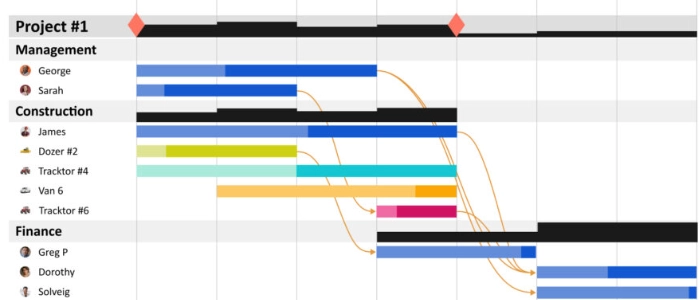
What Is Visual Scheduling? (Team-Based Planning Guide)
Most schedules fail the moment reality hits.
Plans live in spreadsheets, tools, or calendars that only a few people understand — and no one updates fast enough.
Visual scheduling fixes that.
What Is Visual Scheduling?
Visual scheduling is a way of planning and coordinating work using visible signals that everyone on the team can see and understand.
Instead of hidden timelines or static plans, work is displayed openly — making priorities, progress, and constraints immediately clear.
The goal is shared understanding, not perfect prediction.
Why Traditional Scheduling Breaks Down
Traditional schedules assume stability.
Real work is dynamic.
When plans change but visibility does not, teams lose alignment. Decisions slow down. Bottlenecks appear too late.
Visual scheduling keeps plans flexible and visible at the same time.
Core Elements of Visual Scheduling
- Work items displayed visually
- Clear prioritization
- Shared ownership of updates
- Fast feedback when conditions change
When something changes, everyone sees it immediately.
Visual Scheduling vs Task Lists
Task lists show what exists.
Visual schedules show how work unfolds over time.
This distinction matters when teams coordinate across roles, projects, or competing priorities.
How Visual Scheduling Supports Team-Based Planning
Visual scheduling shifts planning from an individual activity to a team activity.
Instead of one person maintaining the plan, the plan becomes a shared artifact.
This reduces handoffs, misalignment, and last-minute surprises.
Visual Scheduling and Lean Thinking
Visual scheduling aligns closely with Lean principles.
It helps teams focus on flow, limit overload, and expose problems early.
These articles provide essential context:
- The Complete Guide to Lean Transformation
- Lean Culture vs Lean Tools: What Actually Drives Change
- Kaizen vs Lean: What’s the Difference?
Visual Scheduling as a Learning System
Visual schedules do more than coordinate work — they support learning.
By making assumptions and outcomes visible, teams can adjust quickly.
This learning loop is strengthened when paired with:
Common Mistakes to Avoid
- Overloading the schedule with too much detail
- Failing to update visuals regularly
- Using visuals without clear decision rules
Visual scheduling works only when it stays simple and current.
Final Thought
Visual scheduling does not eliminate uncertainty.
It makes uncertainty visible — so teams can respond intelligently instead of reacting too late.
When planning is shared and visible, execution becomes calmer, faster, and more reliable.
