
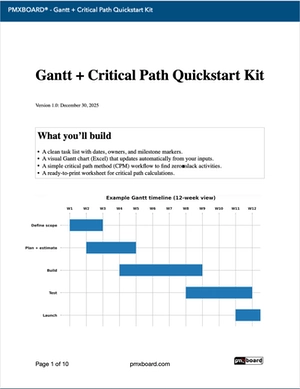
Gantt Chart Template + Critical Path (Free Quickstart Kit)
If you need a practical Gantt chart template and a simple way to spot what actually drives your finish date, this kit gives you both—fast.
Free download: Gantt + Critical Path Quickstart Kit (PDF + Excel)
Build a clean timeline, auto-render the visual Gantt, and confirm the critical path (zero slack) so you know which tasks cannot slip.
Tip: Use the Excel file for day-to-day planning; keep the PDF open as the “rules of the road” for clean schedules.
What this kit helps you do
Build a usable timeline
Capture tasks, dates, owners, and dependencies—then render a visual Gantt you can review weekly.
Find your critical path
Identify the zero-slack chain so you know which tasks must not slip—and where you actually have flexibility.
Run a clean weekly re-forecast
Update actuals, shift dates, and immediately see downstream impact—without rebuilding the whole plan.
What’s inside the kit
- Excel Gantt template with an input table plus an auto-rendered visual Gantt sheet.
- Gantt setup checklist (PDF) to keep tasks, dates, and dependencies clean.
- Critical path explanation in plain English (with a simple example network).
- Critical path worksheet (blank) + a worked example so you can follow along once and repeat forever.
Recommended flow (3 steps)
1
Build the task list
Tasks + dates + owners + dependencies. Keep it readable and reviewable.
2
Render the Gantt
Use the visual sheet for reviews—dates shift, but structure stays stable.
3
Confirm the critical path
Highlight the zero-slack chain so everyone knows what can’t slip.
Critical path in plain English
Your critical path is the chain of dependent tasks with zero slack. If any task on that chain slips, your finish date slips. Non-critical tasks may have slack (float), meaning they can move a little without changing the end date.
Quick rule
If your weekly meeting only has time for one question, make it: “What changed on the critical path since last week?”
Good Gantt habits (that keep plans real)
- Track actuals weekly: update dates, mark completed work, re-forecast.
- Shift tasks immediately: when something moves, adjust downstream tasks the same day.
- Use milestones as decision points: approve, sign-off, go/no-go.
- Keep tasks “reviewable”: if a line item can’t be explained in 10 seconds, it’s too big or too vague.
Want a physical wall version?
If your team works better with a visual board in the room (or on the shop floor), you may prefer a large-format planning surface:
Download the kit
Get the Excel Gantt template plus the PDF quickstart so you can build, review, and re-forecast with confidence.
