
How to Build an Agile Team Operating System
Agile tools are everywhere. But many teams still feel chaotic: too many priorities, unclear ownership, constant context switching, and meetings that don’t translate into progress.
The fix isn’t “more Agile.” It’s building an Agile Team Operating System—a clear, repeatable way your team plans, executes, reviews, and improves work.
What Is an Agile Team Operating System?
An Agile Team Operating System is the set of agreements and routines that make execution predictable:
- How work enters the system (intake + prioritization)
- How work flows (workflow states + WIP limits)
- How the team coordinates (ceremonies + cadences)
- How success is measured (metrics + outcomes)
- How improvement happens (retros + experiments)
Think of it like a “team playbook.” Once it’s in place, you spend less time figuring out how to work—and more time delivering value.
Why Most Agile Implementations Fail
Teams usually struggle for predictable reasons:
- Too many priorities: everything is urgent
- Unclear ownership: tasks float between people
- No stable cadence: planning and review happen randomly
- Work is invisible: status lives in tools, not in the team’s shared view
- Agile theater: ceremonies exist, but outcomes don’t improve
An operating system solves this by defining what “good” looks like and making it repeatable.
The 7 Building Blocks of an Agile Team Operating System
1) Define your North Star (outcomes, not output)
Start with clarity: what result are you trying to create?
- Customer outcomes (speed, reliability, usability)
- Business outcomes (revenue, retention, cost reduction)
- Operational outcomes (lead time, quality, predictability)
Then translate that into team-level goals for the next 4–12 weeks.
2) Establish roles and decision rights
Agile is faster when ownership is clear. At a minimum, define:
- Work owner: who decides priority and scope (often a Product Owner / lead)
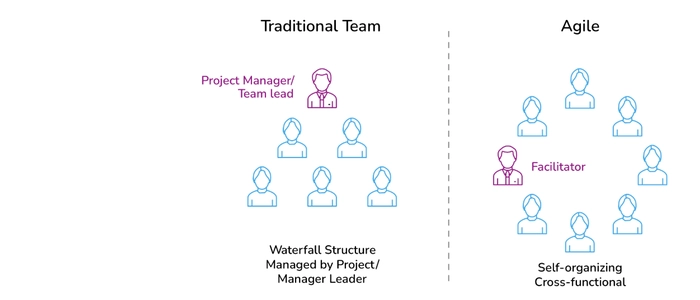
- Delivery owner: who facilitates flow and removes blockers (often a Scrum Master / team lead)
- Implementers: the cross-functional team who delivers
Even if you don’t use official Scrum titles, you still need clear decision-making paths.
3) Create a simple intake and prioritization mechanism
Your system needs a controlled entry point for new work.
Use a backlog (or request queue) with basic rules:
- Every request needs a clear problem statement
- Requests have a rough size / effort signal
- Priorities are reviewed on a cadence (weekly is common)
- Emergency work has a defined exception path
This prevents random interruptions from destroying flow.
4) Design your workflow (and make it visible)
Define the states work moves through. Keep it simple at first, for example:
- Ready
- In Progress
- Review / Test
- Done
Then make it visible with a shared board—digital, physical, or both.
Key rule: if the team can’t see it, the team can’t manage it.
5) Set WIP limits to protect focus
Without Work-in-Progress limits, teams multitask, delay finishing, and create hidden queues.
Start with a simple constraint:
- Limit “In Progress” items per person or per column
- Prefer finishing over starting
- When WIP is full, the team swarms to unblock work
This single change often creates the fastest improvement in lead time and quality.
6) Define your cadence (the meeting system that actually works)
An operating system needs predictable rhythms. A practical baseline:
- Daily standup (10–15 min): focus on flow, blockers, and finishing
- Planning (weekly or per sprint): commit to a realistic slice of work
- Review / demo: show outcomes, get feedback
- Retro: pick 1–2 improvements to test next cycle
If you use Scrum, these align naturally. If you use Kanban, keep the cadence but make it flow-based instead of sprint-based.
7) Measure what matters (then improve deliberately)
Pick a small set of metrics that guide behavior:
- Lead time: how long work takes end-to-end
- Throughput: how much you finish per week
- WIP: how much is in progress
- Quality signal: defects, rework, escaped issues
Then use retros to run experiments:
- “If we reduce WIP, lead time should drop.”
- “If we tighten intake, interruptions should drop.”
- “If we make blockers visible, predictability should improve.”
One improvement per cycle beats ten “ideas” that never stick.
Physical Boards vs Digital Tools (Use Both If You Can)
Digital tools are great for history and remote visibility. Physical boards are great for:
- Instant visibility in shared spaces
- Better engagement during standups
- Faster alignment and fewer “status” meetings
Many teams run a hybrid approach: physical board for daily execution, digital board for cross-team reporting.
Final Thoughts
Building an Agile Team Operating System isn’t about copying a framework perfectly. It’s about creating a clear, repeatable way to run work—so your team can deliver consistently and improve continuously.
Start simple, make work visible, protect focus with WIP limits, review on a cadence, and improve one step at a time. That’s how high-performing Agile teams stay fast without burning out.
Recommended next reads:
