
How to Reduce Bottlenecks Using Visual Signals
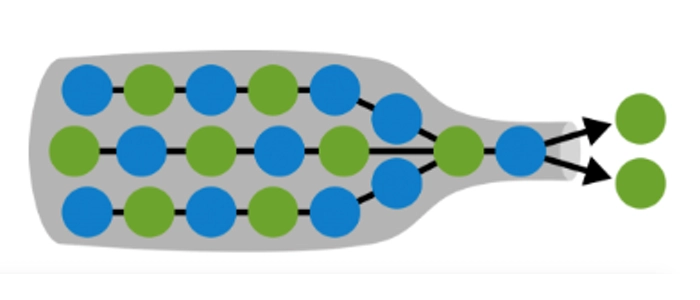
Bottlenecks don’t usually start as “big problems.” They start as small delays: work waiting for review, tickets piling up in one column, or one person becoming the default approver for everything.
The fastest way to reduce bottlenecks is not another meeting or a new tool—it's making constraints visible.
In Kanban and Lean, visual signals help teams see flow issues early, respond quickly, and prevent small delays from turning into major slowdowns.
This guide shows practical visual signals you can add to your workflow today—whether you’re using a wall board, a whiteboard, or a hybrid setup.
What “Visual Signals” Mean in Kanban
A visual signal is any simple, consistent cue that tells the team:
- Work is stuck or at risk
- A column is overloaded
- A dependency is blocking progress
- A priority is changing
- Help is needed now (not later)
Think of visual signals as “traffic signs” for work. They reduce the time it takes to notice problems—and the time it takes to react.
Why Bottlenecks Happen (In Plain Terms)
Most bottlenecks come from one of these patterns:
- Too much WIP: work piles up faster than it gets finished
- Hidden queues: work is “waiting” but nobody sees it
- Specialists become chokepoints: one role or person gates progress
- Batching: reviews/testing/approvals happen in big chunks instead of continuously
- Unclear policies: “done” or “ready” means different things to different people
Visual signals don’t magically eliminate these issues—but they make them impossible to ignore, which is the first step to fixing them.
7 Visual Signals That Reduce Bottlenecks Fast
1) WIP limits that are visible on the board
If a column can hold infinite work, it will. Set a WIP limit and display it directly on the column header (example: In Progress (WIP 5)).
When the limit is hit, your team has a clear rule: stop starting, start finishing.
2) Over-limit alerts (simple “red line” rule)
Pick a clear overload signal:
- A red magnet placed at the top of an overloaded column
- A dashed line drawn across the column to mark “safe capacity”
- A bright label that appears only when WIP is over the limit
The point is instant recognition: “This column is a bottleneck right now.”
3) Aging signals (how long work has been stuck)
Many bottlenecks hide as “quiet waiting.” Use one of these:
- Write the start date on each card
- Add a small “day count” (e.g., D3 = day 3)
- Use a simple rule: if an item hasn’t moved in 2 days, it gets flagged
Work item aging is one of the most reliable visual signals for early bottleneck detection.
4) Blocked markers (make blockers obvious)
Blocked work is work that can’t flow, and it should look different immediately. Examples:
- A bold “BLOCKED” tag or red dot on the card
- A blocker magnet clipped to the card
- A separate “Blocked” swimlane area so blockers don’t hide in normal flow
Rule of thumb: if something is blocked, it becomes today’s conversation—not next week’s.
5) Expedite lane (for true emergencies only)
Some tasks are legitimately urgent. If everything is “urgent,” you create chaos. Use an expedite lane:
- One small swimlane at the top
- Limit it to 1 item at a time
- Use a distinct color or marker for expedite cards
This reduces bottlenecks by protecting the normal workflow from constant disruption.
6) “Help needed” signals (pull support to the bottleneck)
Bottlenecks shrink when the team swarms the constraint. Add a simple signal that means “I need help now,” such as:
- A magnet labeled HELP
- A sticky flag on the card
- A small icon printed/marked in the corner
This changes team behavior from “everyone stays in their lane” to “we finish together.”
7) Visual policies (ready/done definitions)
Many bottlenecks are caused by rework and unclear handoffs. Post short, visible policies right on the board, like:
- Ready for Review: acceptance criteria written + tests run
- Ready for Deploy: approved + documented + release note added
When policies are visible, you prevent work from entering a step before it’s truly ready—reducing jams.
How to Use Visual Signals in Your Daily Standup
In a Kanban-style standup, don’t go person by person. Go work item by work item (right to left):
- Start at Done / Ready to Release
- Look for blocked items and aged items first
- Check any columns over WIP limits
- Assign quick actions: swarm, unblock, split work, or pause new starts
This keeps the standup focused on flow and bottlenecks—exactly where visual signals help most.
What to Do When You Find a Bottleneck
Once the board tells you where the constraint is, use one of these proven responses:
- Swarm: temporarily move people to help clear the bottleneck
- Split: break large items into smaller pieces that can move faster
- Change policies: reduce review batch size, add clearer entry criteria
- Rebalance: adjust WIP limits to reflect real capacity
- Remove blockers: escalate dependencies and eliminate waiting
Final Thoughts
Bottlenecks are normal. What kills teams is not seeing them early.
When you add clear visual signals—WIP limits, blocked markers, aging cues, and simple policies—you reduce bottlenecks by making flow problems visible and actionable in real time.
Related reading:
