
What Is a Scrum Board? Full Walkthrough for Beginners
If you’re new to Scrum, the Scrum board can look deceptively simple — just columns and cards.
But behind that simplicity is one of the most powerful tools for helping Agile teams plan, align, and deliver work consistently.
This beginner-friendly walkthrough explains what a Scrum board is, how it works, and how to use it properly — without jargon, fluff, or overcomplication.
What Is a Scrum Board?
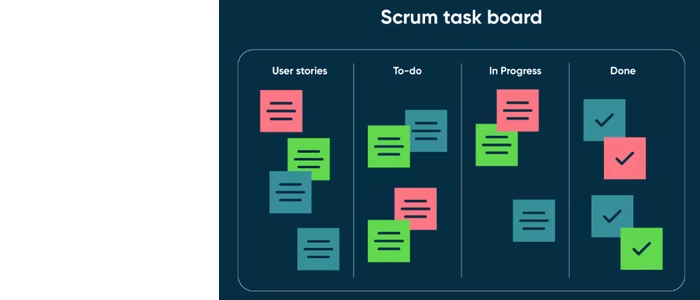
A Scrum board is a visual tool used by Scrum teams to track work during a sprint.
It shows:
- What work is planned
- What work is in progress
- What work is completed
The board gives the entire team a shared, real-time view of sprint progress.
Why Scrum Boards Exist
Scrum boards solve a core Agile problem:
How do we keep everyone aligned during fast-moving, time-boxed work?
Instead of relying on reports or meetings, the board makes progress visible at a glance.
Basic Scrum Board Structure
Standard Columns
- To Do: Work selected for the sprint but not started
- In Progress: Work actively being done
- Done: Work that meets the Definition of Done
Some teams add columns like “Testing” or “Review,” but beginners should keep it simple.
What Goes on a Scrum Board?
User Stories and Tasks
Each card on a Scrum board represents a piece of sprint work — usually a user story or a task derived from a story.
Cards typically include:
- Short description
- Owner
- Estimated effort (often story points)
Scrum Board vs Kanban Board
Scrum boards and Kanban boards look similar — but they serve different purposes.
- Scrum boards reset every sprint
- Kanban boards flow continuously
Scrum focuses on commitment and cadence. Kanban focuses on flow and limits.
How a Scrum Board Is Used During a Sprint
1. Sprint Planning
The team selects work from the product backlog and places it in “To Do.”
Each card represents a sprint commitment.
2. Daily Scrum
The board becomes the centerpiece of daily standups.
Teams don’t ask, “What did you do yesterday?” They ask, “How do we move cards to Done?”
3. Sprint Review
Completed cards show what value was delivered.
4. Sprint Retrospective
The board helps teams reflect on:
- Where work got stuck
- Where flow slowed down
- How to improve next sprint
Understanding Flow on a Scrum Board
Even in Scrum, flow matters.
These concepts help teams move beyond “busy” toward predictable delivery:
- Flow Efficiency Formula (Explained So Anyone Can Use It)
- Flow Efficiency: The Metric That Shows True Productivity
- Little’s Law Explained: Why Flow Is Predictable
- Lead Time vs Throughput: Which Metric Should You Track?
- How to Improve Team Throughput Without Adding Headcount
Common Scrum Board Mistakes
❌ Treating the Board as a Status Tool
The board is for collaboration, not reporting.
❌ Overloading “In Progress”
Too many cards mean slow delivery.
❌ Moving Cards Without Finishing Work
Only move cards when the work state truly changes.
Physical vs Digital Scrum Boards
Digital boards are convenient — but physical boards create awareness.
With a physical Scrum board:
- Work is impossible to ignore
- Bottlenecks become obvious
- Team conversations improve
This is why many teams use physical boards alongside digital tools.
When to Move Beyond Basic Scrum Boards
As teams mature, they often start exploring:
This doesn’t mean abandoning Scrum — it means improving how work flows.
Final Thoughts
A Scrum board is not just a board.
It’s a shared thinking tool that helps teams:
- Commit clearly
- Collaborate daily
- Deliver predictably
For beginners, mastering the Scrum board is often the first step toward true Agile maturity.
Product Tie-In — PMXBOARD Scrum Boards
PMXBOARD Scrum Boards are designed to support sprint-based work with clean layouts, strong magnetic cards, and flexible configurations. Whether you’re running your first sprint or scaling Agile across teams, a clear physical board helps turn Scrum theory into real execution.
