
How to Reduce Work in Progress (WIP): Practical Techniques
If your team feels “busy” all the time but delivery is still slow, the problem usually isn’t effort — it’s too much Work in Progress (WIP).
High WIP creates longer queues, more context switching, more hidden blockers, and less finishing.
In this guide, you’ll learn practical, real-world techniques to reduce WIP without killing momentum — so you can deliver faster, with less stress, and more predictability.
What Work in Progress (WIP) Actually Means
WIP is any work that has been started but not finished. On a Kanban board, it’s everything that’s currently sitting in columns like “In Progress,” “Review,” “Testing,” “Waiting,” etc.
Important: WIP isn’t only the number of tasks being worked on — it’s also the number of tasks waiting while started.
Why High WIP Hurts (Even When Everyone Is Working Hard)
Here’s what typically happens when WIP gets too high:
- Lead time increases because items spend most of their time waiting in queues.
- Throughput plateaus because people switch context instead of finishing.
- Quality drops because rushed handoffs and rework grow.
- Blockers hide because too many items create visual noise.
This is why reducing WIP often improves results faster than any “work harder” initiative.
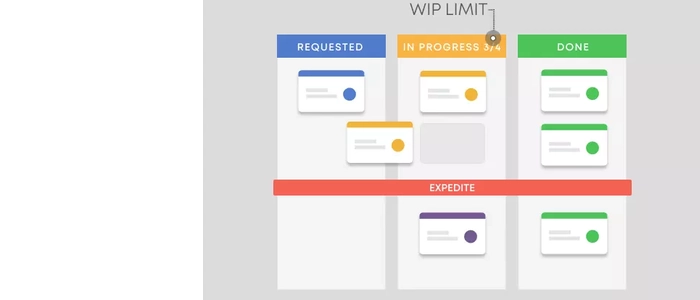
Technique 1: Set a Simple WIP Limit (Then Protect It)
The most direct move is to set a visible WIP limit on your board.
Start simple:
- Pick one column (usually “In Progress”).
- Set a limit that feels slightly uncomfortable — but realistic.
- When you hit the limit, the rule is: stop starting, start finishing.
If your board is physical, write the limit at the top of the column (e.g., “WIP limit: 4”). The visibility matters.
Technique 2: Make “Finish” the Default, Not “Start”
Many teams unconsciously reward starting: “Look how many tasks we kicked off!”
But flow improves when you reward finishing.
Try these small behavioral changes:
- When someone becomes free, they ask: “How can I help finish something?”
- Only pull new work when the downstream steps (review/testing) have capacity.
- Celebrate “Done,” not “In Progress.”
This single mindset shift reduces WIP naturally — without needing a complex policy.
Technique 3: Create a Clear “Ready” Policy
One cause of ballooning WIP is half-baked work entering the system. It gets started, then stalls because something is missing.
Define what “Ready” means before work can move into “In Progress.” For example:
- Acceptance criteria written
- Dependencies identified
- Owner assigned
- Scope small enough to finish quickly
When you prevent unclear work from entering, you reduce stalled WIP immediately.
Technique 4: Shrink Work Items (So They Flow)
Big tasks stay “in progress” longer — which inflates WIP even if the count looks low.
Practical ways to shrink work:
- Split by workflow step (design first, then build, then test)
- Split by customer value slice (deliver a usable subset)
- Split by risk (do the uncertain part early as a small experiment)
A good rule: if a card can’t move to “Done” within a short window, it’s probably too large.
Technique 5: Visualize Blocked Work (So It Stops Hiding)
Blocked items increase WIP without producing results.
Make blockers impossible to ignore:
- Use a dedicated “Blocked” marker/magnet on the card
- Write the blocker reason on the card (one sentence)
- Set a policy: blocked work must be reviewed daily
When blocked work is visible, teams stop starting more work “to stay busy” — and instead solve the real constraint.
Technique 6: Limit WIP at the Team Level (Not Just Per Person)
If everyone has “their own” tasks, WIP stays high even when each person is “only” working on one thing.
Try team-level limits:
- WIP limit for the column
- WIP limit for the whole system (all started items)
- Explicit pairing/swarming rules to finish the oldest item first
Team limits encourage collaboration — and finishing.
Technique 7: Manage the Bottleneck First (That’s Where WIP Piles Up)
WIP doesn’t grow randomly — it piles up at the bottleneck.
To reduce WIP sustainably, locate the constraint and manage it intentionally:
- Where do cards consistently queue up?
- Which step has the longest waiting time?
- Where does work bounce back for rework?
Then apply targeted fixes:
- Add temporary help to the bottleneck (swarm)
- Reduce upstream intake until the bottleneck clears
- Simplify handoffs (merge steps where possible)
- Improve quality earlier to reduce rework at the bottleneck
Related reading (same category):
- Bottlenecks: How to Identify and Remove Them
- The Science of Bottlenecks: Why Work Gets Stuck
- How to Reduce Bottlenecks Using Visual Signals
- The Theory of Constraints: How to Fix the One Thing Blocking You
- Flow Efficiency: The Metric That Shows True Productivity
Technique 8: Use an “Aging WIP” Check
Even with WIP limits, items can quietly rot in the system.
Add a simple rule:
- If a card has been in-progress longer than X days, it gets reviewed.
- Decide: finish it, split it, or stop it.
This prevents “zombie work” from inflating WIP forever.
Technique 9: Stop Multitasking with a Clear Pull Rule
Multitasking is a WIP multiplier.
A practical pull rule for knowledge work:
- One person = one active card (unless swarming)
- If you’re blocked, you don’t start something new — you help unblock or swarm to finish
This creates a calm rhythm: fewer starts, more finishes.
How to Know Your WIP Reduction Is Working
When WIP drops, you should see:
- Lead time trending down (customers get work faster)
- Less “in progress” clutter and fewer stalled items
- More finishing behavior and cleaner handoffs
- More predictable delivery
Cross-category reads (as provided):
- How to Reduce Work in Progress (WIP): Practical Techniques
- How to Measure Work-in-Progress (WIP) the Right Way
- The Ultimate Guide to WIP Limits: Why 3 Is the Magic Number
Final Thoughts
Reducing WIP is one of the fastest ways to improve flow. It lowers stress, shortens delivery time, exposes real bottlenecks, and makes progress feel real again.
Start with one change: set a small WIP limit on one column and build the habit of finishing before starting. Once the team sees the difference, expanding the practice becomes much easier.
Product Tie-In — PMXBOARD Kanban Board Sets
WIP control only works when it’s visible and consistently followed. A physical Kanban board supports that daily discipline because everyone can see the queue, the bottleneck, and the WIP limit at a glance.
PMXBOARD Kanban Board Sets are designed to make that visual flow management effortless — clear layouts, reusable magnetic cards, and a system your team can update together in real time.
