
What Are Swimlanes? (Kanban & Agile Explained)
Kanban boards make work visible. But as soon as you have multiple work types (urgent vs normal, different teams, different request sources), one board can start to feel messy.
Swimlanes solve that problem by adding a simple second dimension to your board — so you can keep work organized without creating multiple confusing boards.
What Is a Swimlane?
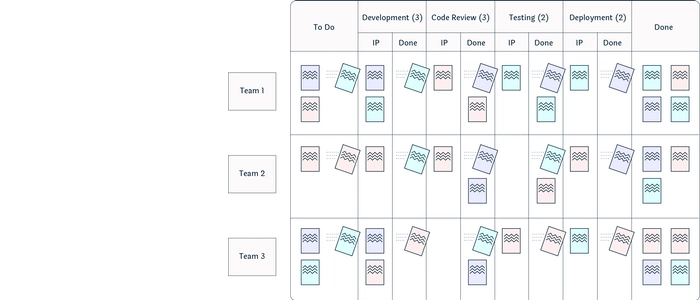
A swimlane is a horizontal (or sometimes vertical) “lane” that groups work items on the same Kanban board based on a specific rule.
Instead of one big wall of cards, swimlanes let you separate work by things like:
- Priority (Expedite / Standard)
- Class of service (Fixed date / Intangible / Standard)
- Team or function (Design / Engineering / Ops)
- Work type (Bugs / Features / Requests)
- Customer or project (Client A / Client B)
The key idea: one board, multiple “tracks” of work.
Why Swimlanes Exist (The Real Problem They Fix)
Swimlanes are useful when teams face one or more of these situations:
- Urgent work keeps hijacking everything (and no one can tell what’s truly urgent)
- Different work types need different handling (bugs don’t flow like features)
- Multiple teams share the same workflow (and the board becomes a cluttered mix)
- Work gets stuck but you can’t see where the “stuck pattern” is coming from
Swimlanes make these patterns visible fast — and visibility is where improvement starts.
Swimlanes vs Columns
It helps to separate what each board element is responsible for:
- Columns show stage of work (To Do → In Progress → Done)
- Swimlanes show type of work (Urgent vs Standard, Team A vs Team B, etc.)
If your columns are your process, your swimlanes are your “work categories.”
The Most Useful Swimlane Types
1) Priority Swimlanes (Urgent vs Standard)
This is the most common swimlane setup because it stops “everything is urgent” behavior.
- Top lane: Expedite / Urgent
- Middle lane: Standard
- Bottom lane: Low priority / Optional
Rule of thumb: keep the urgent lane tiny. If the urgent lane is always full, it’s not a lane — it’s your default workflow (which is a warning sign).
2) Class of Service Swimlanes
Classes of service are explicit policies for how you treat different kinds of work. Swimlanes make those policies visible.
- Fixed Date: must finish by a deadline
- Expedite: urgent and disruptive, used sparingly
- Standard: normal priority work
- Intangible: improvements that matter, but aren’t “screaming” yet
3) Team/Function Swimlanes
If multiple groups share one board, swimlanes keep it readable while still showing one end-to-end workflow.
Example:
- Lane 1: Design
- Lane 2: Engineering
- Lane 3: QA / Release
This can work well only if your team agrees on clear entry/exit rules for each lane (more on that below).
4) Work Type Swimlanes (Bugs vs Features)
Different work types behave differently. Swimlanes help you avoid mixing apples and oranges when reviewing flow.
Example:
- Lane 1: Bugs
- Lane 2: Features
- Lane 3: Internal improvements
When You Should Use Swimlanes
Swimlanes are a great idea when:
- You have multiple work types with different urgency or handling rules
- You want one shared board instead of multiple boards no one checks
- Your daily board review feels like “card chaos”
- You want to improve predictability by making policies visible
Swimlanes are usually not a good idea when:
- You’re still learning basic Kanban (start with a simple board first)
- You can’t clearly explain the lane rules in one sentence
- You keep adding lanes to “represent reality” (that becomes a wall chart, not a system)
How to Set Up Swimlanes Step-by-Step
Step 1: Choose One Reason
Pick a single swimlane purpose (priority, work type, team, etc.). Don’t try to solve five problems at once.
Step 2: Define the Lane Rules (Policies)
For each lane, write a simple policy everyone can follow.
Examples:
- Expedite lane: “Only true emergencies. Maximum 1 item at a time.”
- Fixed Date lane: “Deadline within 2 weeks and business-critical.”
- Bug lane: “Customer-impacting defects only.”
Step 3: Keep Lane Count Small
Most teams do best with 2–4 lanes. More lanes usually reduces clarity instead of increasing it.
Step 4: Add WIP Limits Per Lane (Optional but Powerful)
Swimlanes are even more useful when you limit how much work can live in each lane.
If you want to improve predictability, controlling WIP is non-negotiable.
Step 5: Review the Board the Same Way Every Day
Use a consistent board-walk approach:
- Start from the right (closest to done) to reduce aging work
- Check the blocked/waiting items first
- Confirm lane rules are being followed
Swimlanes and Flow Metrics
Swimlanes help you measure flow more accurately because you can compare similar work against similar work.
These metrics pair especially well with swimlanes:
- Lead time (how long items take end-to-end)
- Cycle time (time spent in active workflow)
- Throughput (items completed per time period)
If you want to go deeper on these:
- Lead Time vs Throughput: Which Metric Should You Track?
- Little’s Law Explained: Why Flow Is Predictable
- How to Reduce Lead Time in Knowledge Work
- What Is Lead Time vs Lag Time? (Easy Explanation)
- What Is Cycle Time? (Beginner Lean Guide)
Common Swimlane Mistakes (And How to Avoid Them)
Mistake 1: Too Many Lanes
If the board takes longer to understand than the work takes to do, you’ve overbuilt it.
Mistake 2: Lanes Without Rules
If anyone can put any card in any lane, swimlanes become decoration. Define policies.
Mistake 3: Urgent Lane Becomes the Default
This is the fastest way to destroy flow. Keep urgent work rare and explicit.
Mistake 4: Lanes Replace Real Improvement Work
Swimlanes reveal issues — they don’t fix them. Use what you learn to reduce waiting, rebalance capacity, and improve flow.
How Swimlanes Connect to Continuous Flow
Swimlanes help create smoother flow by making work policies visible. But to truly improve speed and predictability, teams must reduce waiting and batch behavior.
These related reads will connect the dots:
- Flow Efficiency Formula (Explained So Anyone Can Use It)
- What Is Continuous Flow? (And How to Achieve It)
- Kanban Flow vs Batch Processing: What’s Faster?
Final Thoughts
Swimlanes are one of the simplest upgrades you can make to a Kanban board — and one of the most powerful when used with clear policies.
If your board feels crowded or confusing, don’t build a second board. Add swimlanes, define rules, and make your workflow readable again.
Product Tie-In — PMXBOARD Kanban Board Sets
Swimlanes only work if your board stays clear, visible, and easy to update daily. PMXBOARD Kanban Board Sets make swimlanes practical in the real world by giving teams a clean physical layout, durable magnetic cards, and the visibility needed to follow lane policies consistently — without your workflow disappearing behind a screen.
